Microsoft released one of the revolutionized solutions to the virtual desktop market a few years ago. Which is flexible in nature, easy to use, adapt and access anywhere, anytime and connects to your organization network from any device.
Microsoft Cloud PC is a highly available, optimizable virtual machine that gives you a rich user experience without compromising the security of your organization. One of the key aspects here is to consider is security. These Cloud PC are available with one-to-one user mapping. You can consider it just like your own laptop or physical desktop which is running in the Microsoft Cloud. Microsoft Cloud PC are billed per user/month with a fixed fee. So, the IT team need not worry about variable cost in the billing due to excess usage of compute and storage.
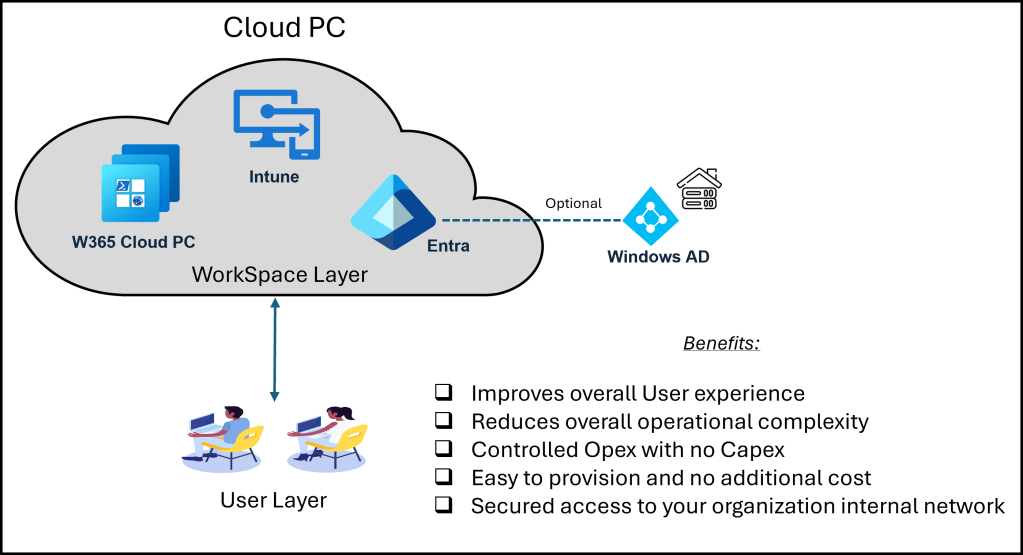
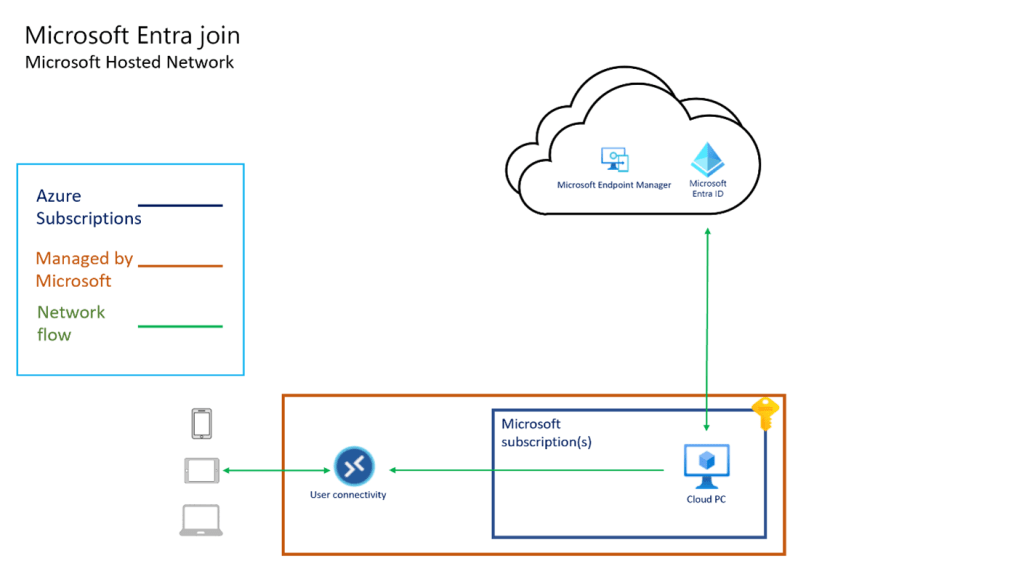
The preceding diagram talks about Cloud PC architecture, Cloud PC management, authentication, resource management, provision is through Microsoft cloud. If an organization is willing to connect their PCs to Windows Active Directory, then you need to have a line-of-sight connectivity between your Azure network to data center AD network.
Microsoft 365 offers a fixed fee for different cloud PC sizes. Before your start implementation, as an architect you should do an assessment and requirement gathering also, understand the requirement of different personas. Below is the table that gives you the type of SKUs available within the Cloud PC deployment and some usage scenarios where Cloud PC are best fit.
| SKU | Cloud PC CPUs, RAM, and storage | Usage scenarios |
| 1 | 2vCPU 4GB RAM 64,128,256 GB Disk | Call Centres, ServiceDesk, Customer Services, |
| 2 | 2vCPU 8GB RAM 128,256 GB Disk | Bring-your-own-PC, work from home, market researchers, government, consultants. |
| 3 | 4vCPU 16GB RAM 128,256,512 GB Disk | Finance, government, consultants, healthcare services, bring-your-own-PC, work from home. |
| 4 | 8vCPU 32GB RAM 128,256,512 GB Disk | Software developers, engineers, content creators, design and engineering workstations. |
| 5 | GPU Standard 4vCPU/16GB/4GBvRAM/512GB GPU Super 8CPU/56GB/12GBvRAM/1TB GPU Max 16vCPU/110GB/16GBvRAM/1TB | Graphic design, image and video rendering, 3D modelling, gaming, data processing, and visualization |
| 6 | 16vCPU 64GB RAM 512, 1000 GB Disk | Software development, engineering, data analysis and visualization, financial services and wealth management. |
Microsoft Cloud PCs are hosted on Microsoft Subscription therefore Microsoft incurs the cost for running and managing this infrastructure, but Microsoft gives you a flexibility to connect your Cloud PCs to your organization through different deployments model.
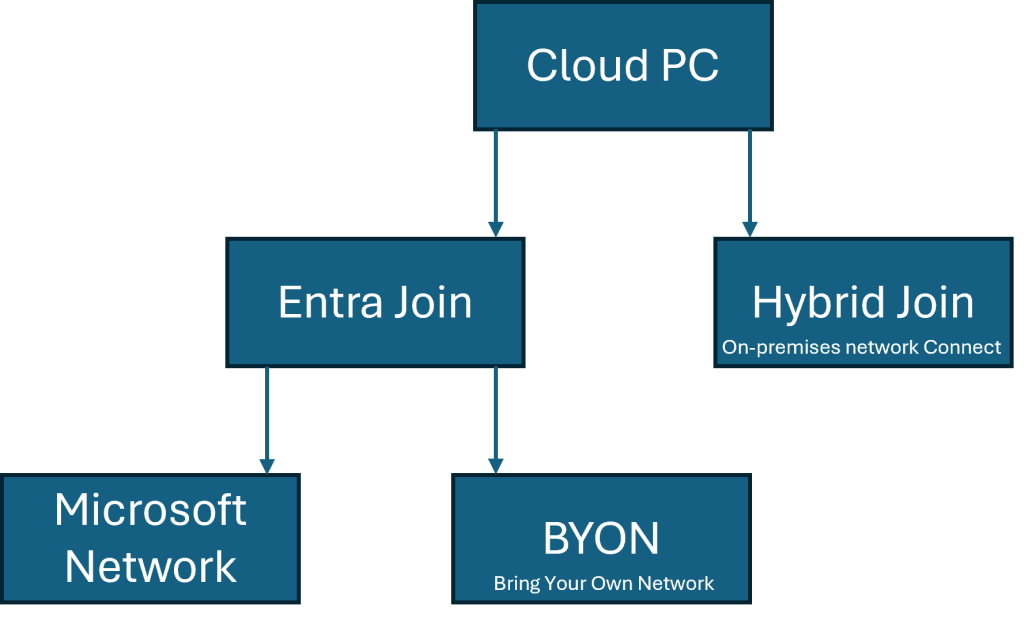
- Microsoft Entra Join with Microsoft Network
This deployment model is one of the simplest and easiest ways to provision your Cloud PCs. No Azure subscription is required and all you need is the required licenses. No network management and express route or VPN connectivity is required. In case you need to have a connection with your organization this is not the right option. These days every organization wants to have secure connection, in such case BYON is the preferred option.
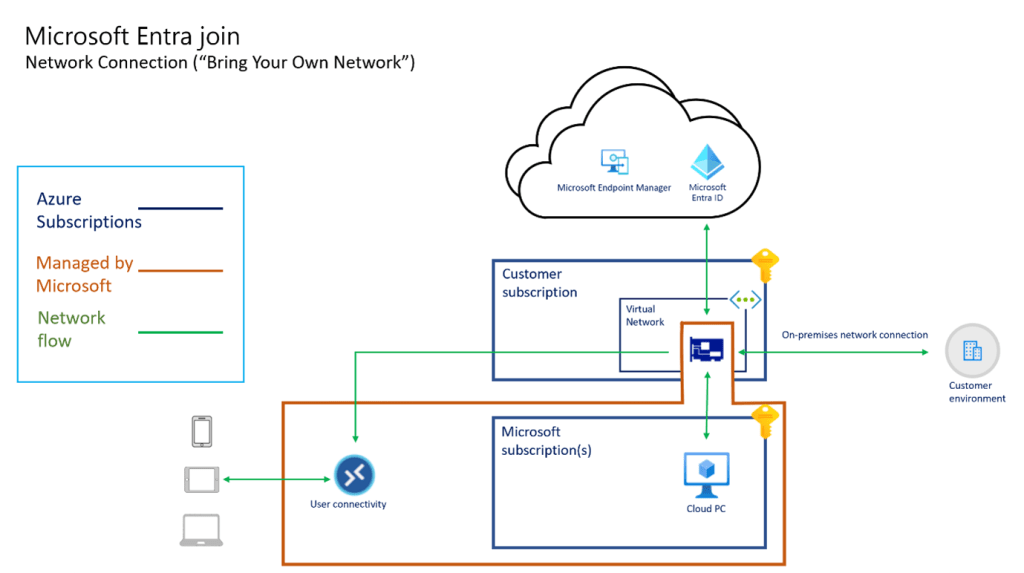
- Microsoft Entra with Bring Your Own Network.
In this deployment model you will have your subscription to connect your virtual network to on-premises network. If user wants to connect to your on-premises network file servers, application servers and others then this is the preferred option, but still your user creation and deletion and addition happens through Microsoft Entra.
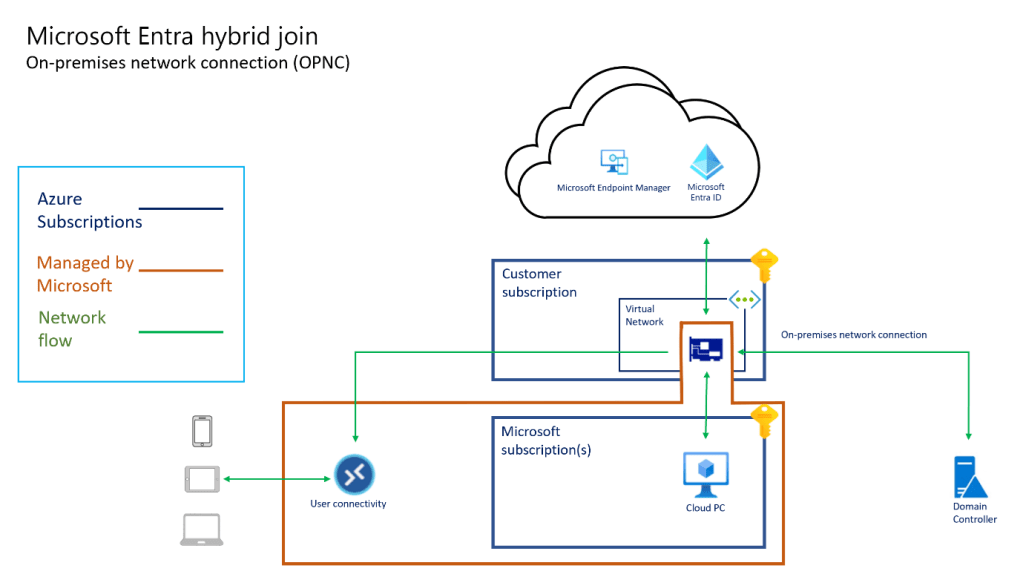
- Microsoft Entra hybrid Join with On-premises network connection.
In this deployment model you need to connect your on-premises AD network with Azure Virtual network. Your on-premises Active Directory is synchronized with Entra so that there should not be any hybrid Entra errors during Windows 365 Cloud PC login and provisioning. There are some pre-requisites to be met before joining or device registration with your on-premises Active Directory. In this deployment model, there will be additional cost on the networking infrastructure either you need to have Express route connectivity or VPN connectivity from Azure DC to your organization data center where your AD services are hosted.
Why Organizations need to shift their focus towards Cloud based workspace solutions.
Many organizations have adopted virtual desktop infrastructure for various reasons. They have been successfully delivering the required workloads to the end-users without compromising on the security. But there are other non-quantifiable parameters such as user experience, sentiment, productivity, active hours, effective usage of resources are difficult to capture and measure.
Cloud PC offers unparalleled flexibility to meet the modern ways of work style of the end-users. They are easy to provision, no challenges in on boarding a new employee, in no time admin can spin of new machines and deliver with the required applications. In any eventuality if your PC or laptop faces challenges due to some outages or application issues, the administrator can use the customized image and provide a new desktop. Here organization’s Recovery to Production (RTP) is very minimal compared to any other workplace solution.
References:
 Home
Home 