Many organizations have challenges in managing the applications that is delivered to the end-users. As everyone knows, application management comprises provisioning, updating, delivering and so on, and it is a resource intensive job for IT staff. If you have more images, it becomes challenging for administrators to patch and update. Fortunately, there are many virtualization solutions that continue to evolve and bring innovative solutions to streamlining the end-user experience and increasing IT manageability.
In the present virtual desktop environment, we often see two forms of desktops persistent and non-persistent. As we all know usage and its applications in these two types of desktops but normally when application is bulky and needs to be consumed by many users experience then your infrastructure will take a hit. Also, these infrastructures are architected to scale to the peak usage of the apps being hosted and when apps are not in use resources sit idle and not efficiently and effectively used.
There are many ways to manage and optimize the infrastructure example publish the apps when users need them instead of keeping app running always aka “Always on”.
Omnissa brought the Apps on Demand for published app environments through the App volumes. With apps on demand, apps are attached to RDSH servers only at the time users launch apps. When the users launch apps, they are loaded and delivered to the end-users’ machine in real time. The farm-less model significantly reduces the number of servers needed to support users and apps. Few of the benefits of are listed below
- Apps on Demand for published apps help to reduce the infrastructure costs and deliver a better ROI.
- Get rid of the traditional way of managing the applications. It allows user-based entitlements allow IT to follow the users instead of managing entitlement individually on each application server.
- App on Demand handles all types of applications, Also, compatible with ThinApp, MSIX App-Attach so IT administrators can easily move their legacy applications to cloud.
- Operating systems and applications are isolated even OS is faulty, the user can access the required application from another machine.
- Because of the OS and apps isolation IT teams can work collaboratively and independently. It makes it easy to manage and update the apps
Omnissa App Volumes integration with App attach in AVD
Now administrators can take advantage of powerful app delivery and lifecycle management capabilities of Omnissa App Volumes to get a better ROI and provide native user experience. The integration is directly available on Azure portal and includes integration with Microsoft Entra ID for elevated security.
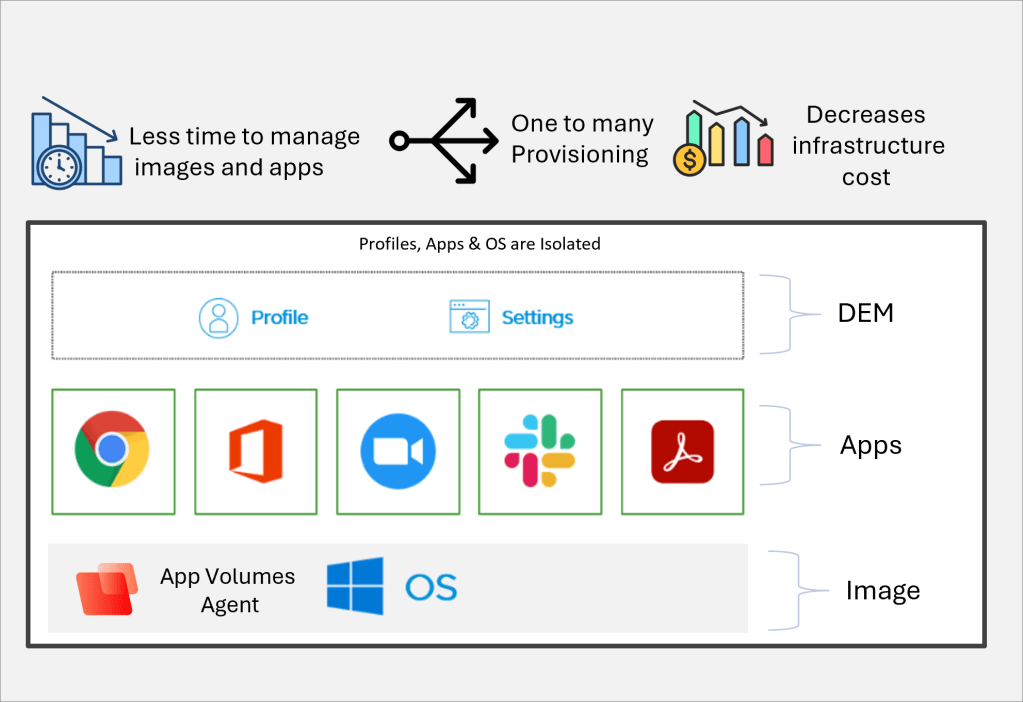
The preceding diagram depicts a modern model for app delivery to the end-user machines. Omnissa has introduced apps on demand capabilities for Azure Virtual Desktops users. Which allows an app to be delivered based on when the user needs an app, this would reduce the logon time and improves the security posture of the environment by reducing surface attach area on Windows devices, also app packaging is made simpler for administrator and need not to look for skilled workforce for it.
Omnissa app volumes is compatible with legacy and modern applications, Customers who are using legacy applications on their on-premises struggling with user experience, increased IT management cost and limited security improvements option, can explore the App on Demand with Azure Virtual Desktops. It is directly available on Azure Marketplace with risk-free six month trial.
References: Omnissa App Volumes
 Home
Home 