
In today’s IT world, many organizations are facing challenges in providing secure access to applications and data due to diverse hybrid environments. The traditional or call it legacy network security models are ineffective and meet the modern digital WorkSpaces security requirement. Most of the network access and architecture poses significant risks, and higher chances of exposing sensitive data and resources. Even though most of the organizations’ infrastructure are shifting towards cloud platforms, they may still rely on on-premises infrastructure and use legacy VPNs to enable remote workforce.
To provide a protected environment to end-users to access private websites, software-as-a service applications, internet, organization internal applications with the required security controls, AWS has solution called “WorkSpaces Secure Browser” previously this product was known as Amazon Secure web. Amazon WorkSpaces Secure Browser is a fully managed, cloud-native, hosted browser service used to deliver resources to end-user security over the browser. WorkSpaces secure Browser works with a user’s existing web browsers and IT within the organization need not manage any appliances, infrastructure, specialized client software or any virtual private network connections.
Browser Security Risks
As we have seen, browsers are not only a tool to access information, but they are the gateways to our digital identities, through the portal end-user engage with the vast universe of the public internet. Our dependencies are growing on these platforms also bringing lot of risks to the organization. Browser attacks in simple terms nothing but where attackers exploit vulnerabilities in web browser to compromise systems. WorkSpaces Secure Browser reduces the risk of data exfiltration by streaming web content. No sensitive company data, document object models are transmitted to local machines, with the isolation of the device, corporate network, and public internet from each other, other browser attack surface is virtually eliminated.
Why Amazon WorkSpaces Secure Browser?
WorkSpaces Secure Browser provides a protected environment for the end-users to access internal or external information over the secure channel. Encrypted pixels are streamed from a remote browser session, with full policy enforcement, which is microservices running in the AWS cloud.
Benefits:
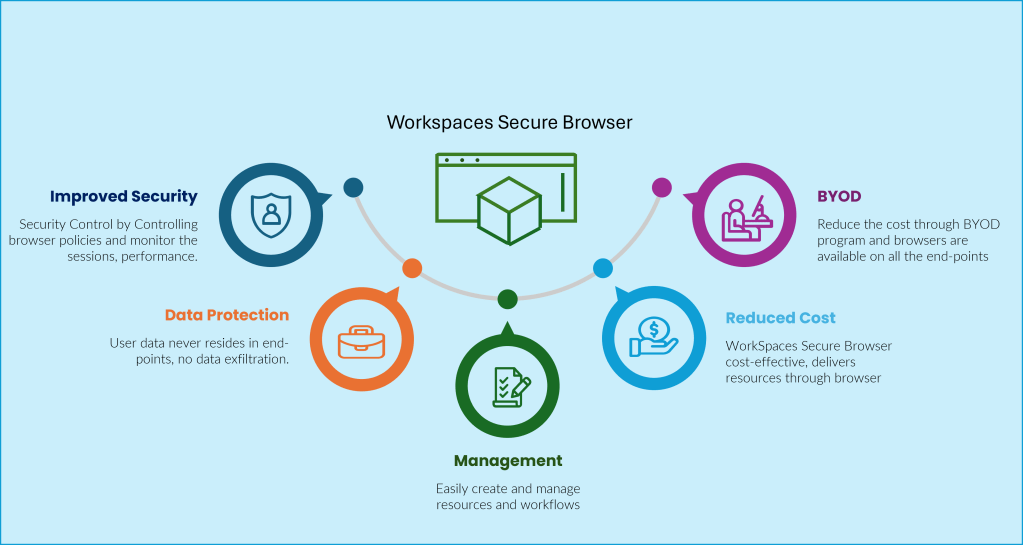
- Elevates security by enforcing browser policies and trusted devices with network access, administrator can easily watch the session availability, its performance and access logs
- End-user data is streamed over the network and data resides in your premises only.
- Centralized management of workflows, resources without additional infrastructure and tools.
- WorkSpaces browser help you to reduce the infrastructural investment and reduce the overall operational costs.
- Tailor made solutions for remote workers, and organizations can easily initiate BYOD programs and meet the end-users’ requirements.
Managing Secure web portal
Once the browser is ready, the administrator can view the web portal details, edit and delete the web portal. There are more than 300 policies available, the administrator can set custom browser policies using Chrome policies available for the stable version. The WorkSpaces Secure Browser also has an option called in-session localization, which detects the user’s local browser language and time-zone setting and applies them to the session, ensuring that the displayed time matches the current time in the user’s location.
By default, WorkSpaces Secure Browser allows users to access resources from anywhere, any device. The administrator has options to allow certain IP addresses to your web portal. By using IP access settings, administrators can define and manage groups of trusted IP addresses and only allow certain users to access their portal when users are on the trusted network.
Single Sign-On experience for the Secure Browser users, that enables an extension for end-users to have a better portal sign-on experience. The extension supported Chrome and Firefox browsers. These extensions do not require the user to sign in and enable cookie synchronization for the allowed domains from the users sign-in to the session.
URL filtering helps administrators to allow or block certain URLs. This helps protect or not by allowing users to visit malicious and unauthorized websites. Secure Browser has a unique feature called deep links to create more dynamic user experiences for the end-user. Deep links open pages in a WorkSpaces Secure Browser session to connect users to a specific website during a session.
Monitoring
The administrator can monitor the session reliability, availability and performance of user session through Amazon CloudWatch. Amazon CloudWatch collects raw data and processes it into readable with real-time metrics. Some of the metrics such as SessionAttempt, SessionSuccess, SessionFailure and CPU, Memory usage are captured for monitoring. Also, with the help of Amazon Kinesis administrators can enable record session events, URL visits, start and stop of the session.
The Amazon WorkSpaces Secure Browser is powered by Amazon DCV (High-performance remote display protocol) web browser client. The web browser client is supported by Chrome and Firefox. The end-user can run the session on Windows, Linux and macOS endpoints.
Conclusion
Amazon WorkSpaces Secure Browser helps organizations to onboard new employees in minutes, rather than days. End-User can bring his/her own devices to access company resources securely. Protecting sensitive data from the admin can enable user settings through Secure Browser such as access to clipboard, file transfer, local storage devices and local printers. The solution can also be integrated with third-party identity providers and the IT team can control access and verify the authenticity of access through MFA. The Amazon WorkSpaces Secure Browser can help the organization/enterprises looking to elevate the end-user experience and security without increasing the operational costs. For more information and pricing please visit the following link.
References: Amazon WorkSpaces Secure Browser
 Home
Home 