Citrix Disaster Recovery Types
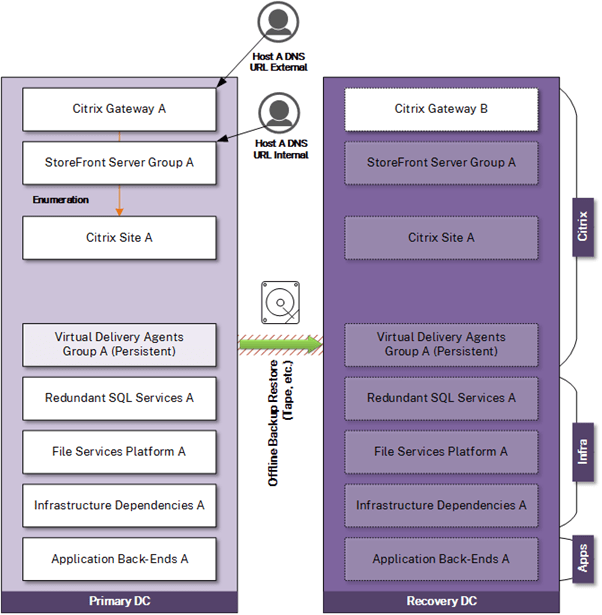
Recovery Option – Recover from Offline Backup
In this option, organizations rely solely on traditional backup solutions to restore the Citrix platform to service in another location. There is no standby infrastructure to fail over to. Multiple, often manual tasks are required in the recovery plan to restore the core services Citrix depends on and later restore Citrix itself. The outage time of Citrix is dictated by the speed at which components can be restored in the DR location. This model is not ideal for advanced Citrix deployments and is best suited for smaller, simpler infrastructures and organizations that can withstand an extended period of downtime.
Pros and Cons
Pros:
- Lower maintenance costs compared to replication or hot-standby solutions
Cons:
- High downtime impact
- Larger, more detailed recovery plan (DR orchestration) documentation
- Extended recovery time
- Relies on integrity and age of backups
- A higher degree of human error if manual reconfiguration is necessary (networking, and so on)
- Unsuitable for Pooled, Fast Clone MCS or PVS
- Unsuitable for NetScaler VPX because of networking (and needs to be rebuilt using backups of nsconfig directory and ns.conf files)
- Considerations must be given to sufficiently extending backup retention scope to accommodate other modern-day threats such as time bombing and ransomware
Use Case and Assumptions
Useful for less mature IT organizations and organizations with limited IT operations budgets and can allow for extended outages to recover core business services. Assumes backups and the recovery process are tested regularly to ensure that the backups are good and the recovery process is well understood by those who have to do it during a real event.
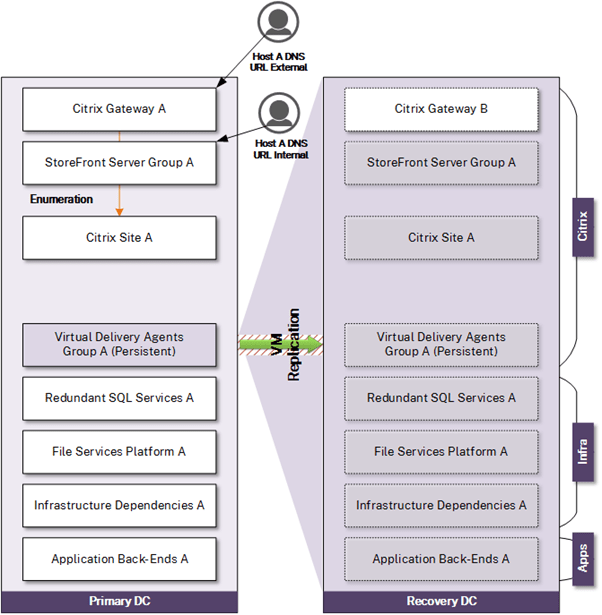
Recovery Option – Recover via Replication
This option is similar to the prior option but uses replication instead of backup from which to restore infrastructure. Replication can reduce some aspects of manual tasks in the recovery sequence and potentially allow RTO to be reduced (and thus restore service faster) but remains reliant on many manual tasks. It is worth noting that replication is not a replacement for backup. Corrupt or compromised data still gets replicated to DR and is thus not useful in such scenarios. Backups must still be considered as a fallback. As with the prior option, this model is not ideal for advanced Citrix deployments and is best suited for smaller, simpler infrastructures and organizations that can withstand an extended period of downtime.
Pros and Cons
Pros:
- Replication is likely automated and aligns with RTO and RPOs
- Likely uses less complex technologies as compared to automated recovery solutions
Cons:
- Relies on administrative intervention
- Larger, more detailed recovery plan (DR orchestration) documentation
- A higher degree of human error if manual reconfiguration is necessary (networking, and so on)
- Unsuitable for Pooled, Fast Clone MCS, or PVS. Recreation of Machine Catalogs is factored into the projected RTO. However, by creating dummy Machine Catalogs in DR or scaling out VDA instances in DR and performing an “Update Catalog” action applying a replicated master image, this RTO can be shortened
- Unsuitable for NetScaler VPX due to networking and thus better suited to employ hot standby NetScaler and assume the cost of doing so
Use Case and Assumptions
Useful for less mature IT organizations and organizations with limited IT operations budgets. This solution relies on storage replication technologies from the SAN vendor or the hypervisor vendor (vSphere Replication, Nutanix Replication, and so on) to replicate VMs to another facility over the WAN.
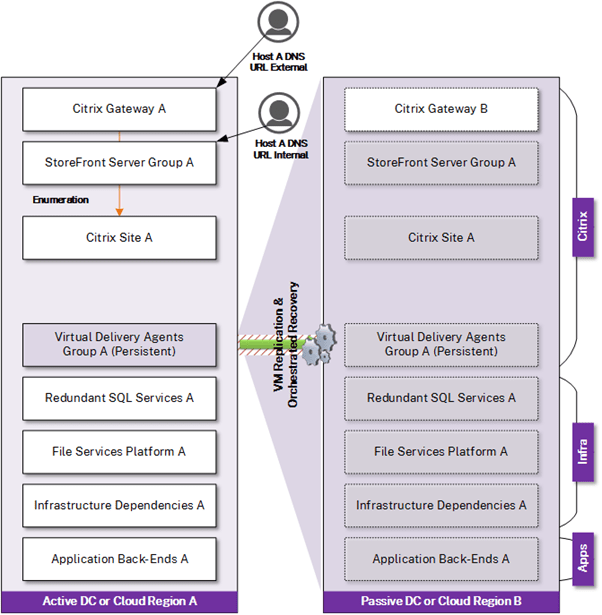
Recovery Option – Replication with Automated Recovery
In this option, automated recovery is introduced for several components of the solution to restore the Citrix infrastructure and its dependencies in the DR location. Technologies that orchestrate automated recovery further reduce manual steps and minimize human intervention (and potential human error), and can further improve RTO by streamlining the recovery of service. It is expected that intervention is still required to fail over to the DR location by way of DNS record modifications. It is worth noting that replication is not a replacement for backup. Corrupt or compromised data still gets replicated to DR and is thus not useful in such scenarios. Backups are still be considered as a fallback. While this model is more mature, it remains unsuitable for use with advanced Citrix configurations or for organizations that can’t tolerate much downtime.
Pros and Cons
Pros:
- Lower maintenance costs compared to hot-standby solutions
- Replication is likely automated and aligns to RTO and RPOs
- Recovery plans tend to be automated
- Less administrative intervention and human error
Cons:
- Relies on more advanced technologies such as VMware SRM, Veeam, Zerto, Nutanix Disaster Recovery Orchestration, XenServer Disaster Recovery, and Azure Site Recovery (ASR) to orchestrate recovery and modify network parameters (unless network segments are stretched)
- Unsuitable for Pooled, Fast Clone MCS or PVS. Recreation of Machine Catalogs must be factored into the projected RTO. However, by creating dummy Machine Catalogs in DR or scaling out VDA instances in DR and performing an “Update Catalog” action applying a replicated master image, this RTO can be shortened
- Unsuitable for NetScaler VPX due to networking and thus better suited to employ hot standby NetScaler
Use Case and Assumptions
Useful for enterprise organizations with appropriate resources and budget for DR facilities. This solution relies on the same storage replication of the previous option but includes DR orchestration technologies to recover VMs in a particular order, adjust NIC configurations (if needed), and so on.
Recovery Option – Hot Standby (Active-Passive) with Manual Failover
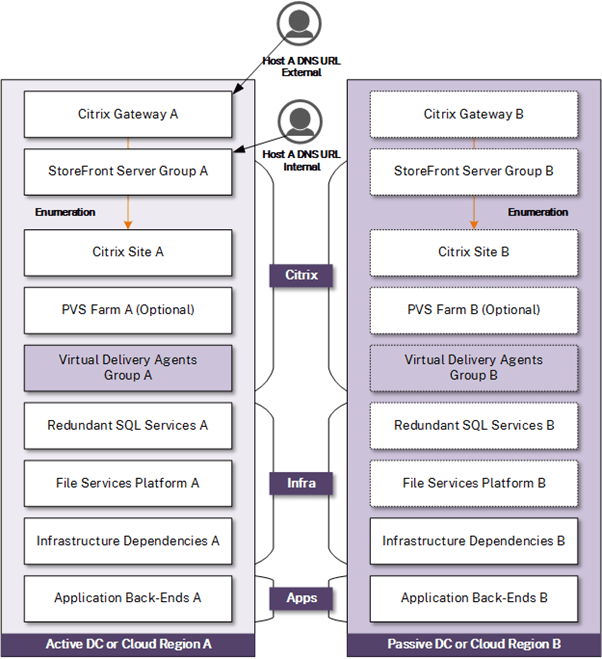
We now start to look at options that use hot standby infrastructure. Although more costly, the advantages of an appropriately designed hot standby model drastically reduce the number of steps required to orchestrate recovery to the DR location, reduce the risk of technology and human errors, and can significantly recovery time. These models do need maintaining separate independent Citrix infrastructures which create more overhead (ongoing maintenance and testing) but accommodate more advanced Citrix deployments that use single image management technologies. In this option, failover relies on administrator intervention to redirect traffic to the alternate location through DNS changes, reducing the cost and complexity of automated failover of the access tier. This option would best suit organizations with sufficient budget to accommodate standby Citrix infrastructure, rely on advanced Citrix configurations, and require low RTO but manually controlled recovery.
Pros and Cons
Pros:
- Short recovery time as the platform is “always on”
- Supports storage and network-dependent components such as NetScaler, MCS, PVS
- Lower recovery plan (DR orchestration) documentation
Cons:
- Relies on administrative intervention to fail over URL or direct users to back up the URL (albeit manual orchestration is sometimes intentional)
- Higher costs due to having “hot” hardware in DR sitting on standby
- Higher administrative overhead to keep standby platform’s configurations and updates in sync with production
Use Case and Assumptions
Useful for enterprise organizations with appropriate resources and budget for DR facilities. Can use a hot standby “fully scaled” platform or a “scale on-demand” platform. The latter can be appealing for cloud recovery to reduce operating costs, with caveats.
At the time of failover, administrators update the DNS entry for one or more access URLs to point to one or more DR IPs for Citrix Gateway and StoreFront, or users are advised by formal communication to begin using a “backup” or “DR” URL.
This manual option can be useful for scenarios where application back-ends can require longer recovery time but would add confusion for users if Citrix was fully available and applications were not.
This model assumes a mature IT organization and enough WAN and compute infrastructure are available to support failover.
Recovery Option – Hot Standby (Active-Passive) with Automated Failover
Similar to the prior hot standby option, this option includes automated failover typically via DNS technologies that detect failures in production and redirect traffic to the DR location. The automated nature does put further emphasis on the IT teams to ensure that configurations are duly maintained in DR and application and data dependencies remain accessible from DR during regular operation to avoid impact to users who might end up in the DR site as a result of an isolated temporary service disruption in production. Capacity management and monitoring (ensuring DR can accommodate the same number of users on Citrix as production) become increasingly critical due to the automated failover capability. This option would best suit organizations with sufficient budget to accommodate standby Citrix infrastructure, rely on advanced Citrix configurations, and require RTO near zero.

Pros and Cons
Pros:
- Short recovery time as the platform is “always on”
- Supports storage and network-dependent components such as NetScaler, MCS, PVS
- Minimal recovery plan (DR orchestration) documentation
- Easier for end-users as URLs fail-over
- Supports EPA Scans at Citrix Gateway with GSLB
Cons:
- Higher costs due to having “hot” hardware in DR sitting on standby and NetScaler licensing. Cost burden can be reduced to an extent if the standby capacity is used by development or other less critical non-production workloads which can be powered down during a DR event to prioritize production recovery
- Higher access tier complexity
- Higher administrative overhead to keep standby platform’s configurations and updates in sync with production
Use Case and Assumptions
A common configuration with enterprise organizations that allows for an automated failover to the DR site via NetScaler GSLB (Advanced or higher needed). This model assumes a mature IT organization and enough WAN and compute infrastructure to support failover. This model also assumes that application and user data dependencies are in alignment with the latest active site versions/updates and recoverable at the DR facility in a similarly automated manner to reduce prolonged impact of service to the end user and confusion due to partial solution functionality.
Recovery Option – Active-Active with Automated Failover
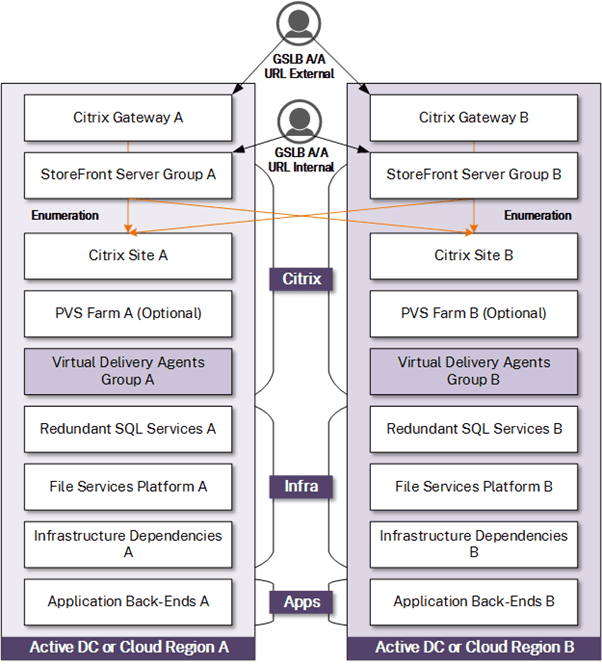
This option builds off the former but during regular operation, both production and DR locations are in active use. Capacity can be managed and monitored tightly, as in such a model it is easier to overlook when either location has surpassed a threshold (say 40–45% usage) to ensure that either location can accommodate the full user load during a DR event. As both environments are used actively, routine validation of most components is built in. However, components that require failover to the DR location (apps, storage arrays, and so on) still undergo routine periodic failover testing. As the model uses two or more active locations, consideration must be given to performance tolerances and variances between locations, especially if the locations span significant geographic distances. Some performance deviations can be minimized in this model by homing users to one location over another (localizing the VDAs) during regular operation and failing over to other VDAs if their local location is unavailable. This model is the most complex, most robust, and accommodates the most advanced Citrix deployments. It is ideal for organizations who need an RTO of zero and desire a model that sees only 50% of users failover during a DR event versus 100%.
Pros and Cons
Pros:
- Short recovery time as the platform is “always on”
- Supports storage and network-dependent components such as NetScaler, MCS, PVS
- Minimal recovery plan (DR orchestration) documentation
- Seamless to end-users
- Supports EPA Scans at Citrix Gateway with GSLB (NetScaler 13.0+ firmware releases from 2022 onward can accommodate EPA scans in Active-Active GSLB configurations, previously functional only in Active-Passive configurations)
Cons:
- Higher costs due to having “hot” hardware in DR sitting on standby and NetScaler licensing. Cost burden can be reduced to an extent if the standby capacity is used by development or other less critical non-production workloads which can be powered down during a DR event to prioritize production recovery
- Highest access tier complexity
- Higher administrative overhead to keep standby platform’s configurations and updates in sync with production
- Relies on administrators to monitor and adjust resource and hardware capacity at all data centers to ensure that as the platform grows, DR capacity integrity is not impacted
Use Case and Assumptions
A more advanced but common configuration with enterprise organizations that allows access tier URLs to operate in an Active-Active manner via NetScaler GSLB (NetScaler Advanced or higher needed). This functionality is useful in environments with local data center proximity to each other, or in situations where data centers can be remote but with the means to pin users to preferred data centers (often driven by advanced StoreFront configurations and GSLB to a lesser extent) for multi-site scenarios.
This model assumes a mature IT organization and enough WAN and compute infrastructure to support failover. This model also assumes that application and user data dependencies are in alignment with the latest site versions/updates and recoverable at the DR facility in a similarly automated manner to reduce prolonged impact of service to the end-user and confusion due to partial solution functionality.
References: Citrix DR
 Home
Home 


